
 Splunk User
6fab978fff
Splunk User
6fab978fff
|
3 years ago | |
|---|---|---|
| .. | ||
| appserver/static | 3 years ago | |
| bin | 3 years ago | |
| default | 3 years ago | |
| local | 3 years ago | |
| metadata | 3 years ago | |
| static | 3 years ago | |
| README.md | 3 years ago | |
| splunkbase.manifest | 3 years ago | |
README.md
Splunk REST storage/passwords Manager for Splunk
About
An intuitive, full-featured, Javascript CRUD interface to the Splunk storage/passwords REST endpoint. If you're an app developer looking to securely store passwords for API's, Custom Alert Actions, Modular Inputs or to access any resource that requires a password, this is your tool! Create, update, delete, view passwords, change permissions, sharing and app scope. Ditch your curl commands and upgrade to this simple to use interface.
Dependencies
To store passwords the user must have the admin_all_objects capability enabled within an assigned role. To read passwords a user must have list_storage_passwords capabilty enabled within an assigned role.
Usage
The Credential Management dashboard provides a CRUD interface to create, update and delete credentials to be used within Splunk apps.
Create Credential
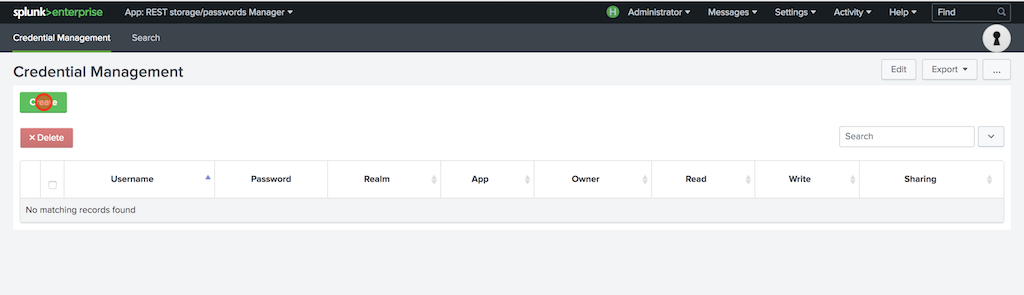
Simply click the create button to reveal the credential creation form.
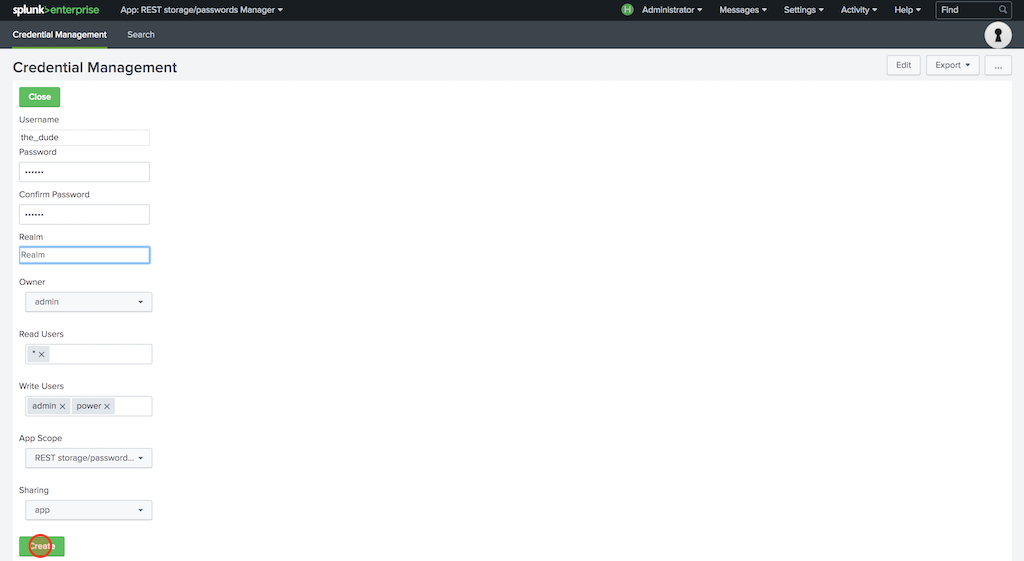
Fill out the form specifying a username, password and optionally a realm. The realm can be used as a descriptor for the credential or left blank; e.g., prod or dev. The form will populate with sane defaults for owner, read users, write users, app scope and sharing. You can update them to whatever you like, including the target app context, before you hit create.
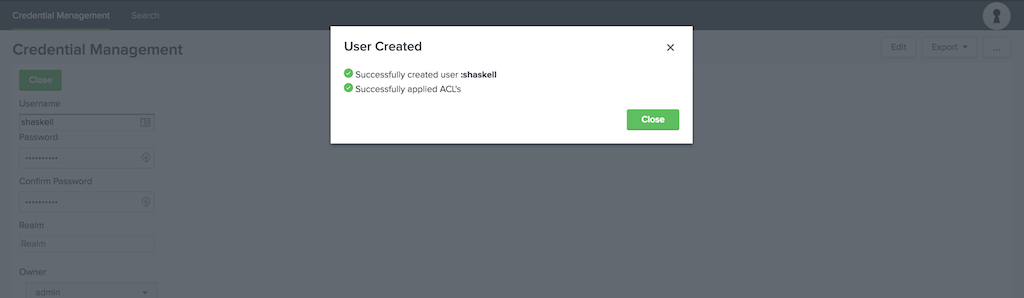
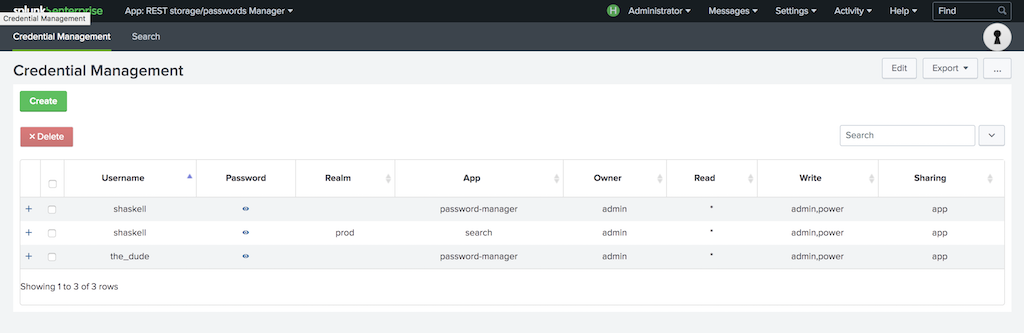
Once created, the dashboard will be refreshed automatically.
Update Credential
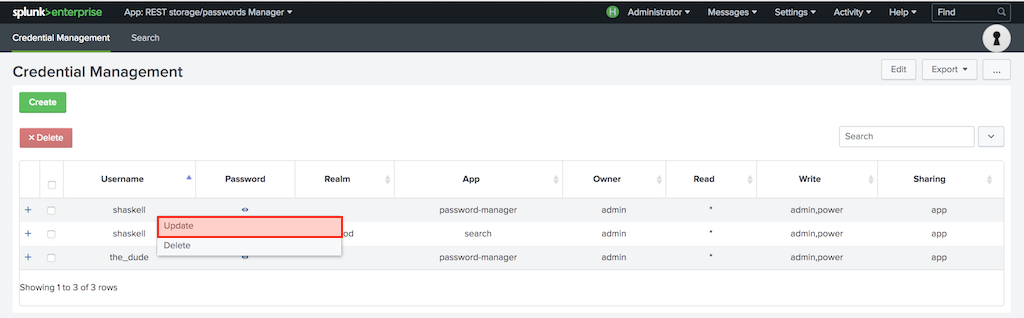
Right click on a table entry to reveal a context menu that allows you to update the credential.
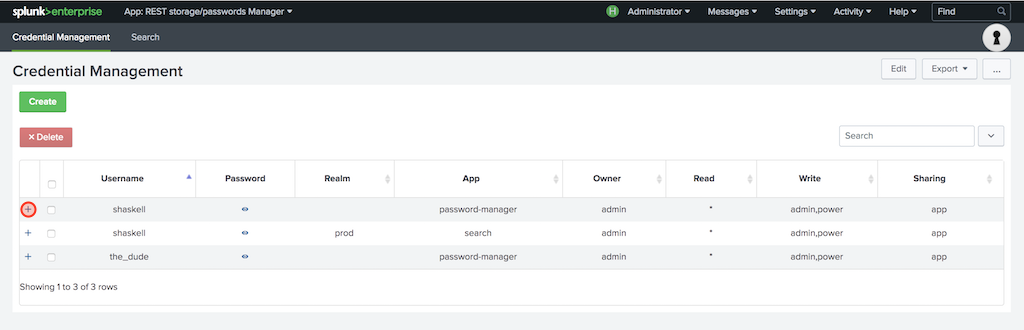
Alternatively, you can click the detail view (plus icon) in the table to update the credential.
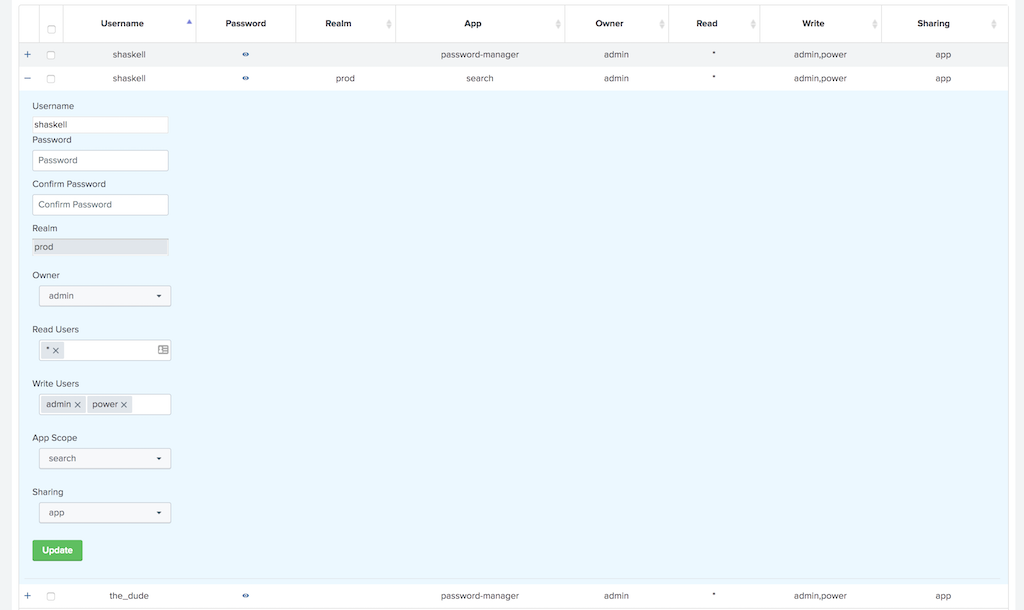
The update form will be rendered under the selected row in the table. You can change the password, any of the permissions or the app context when updating. The realm is the only field that cannot be changed. This is a limitation of the storage/passwords REST endpoint, not the app. You don't have to set the password to update the ACL's on the credential or move between apps. Simply choose new permissions or app scope and hit update.
Delete Credential
Right click on a table entry to reveal a context menu that allows you to delete the credential.
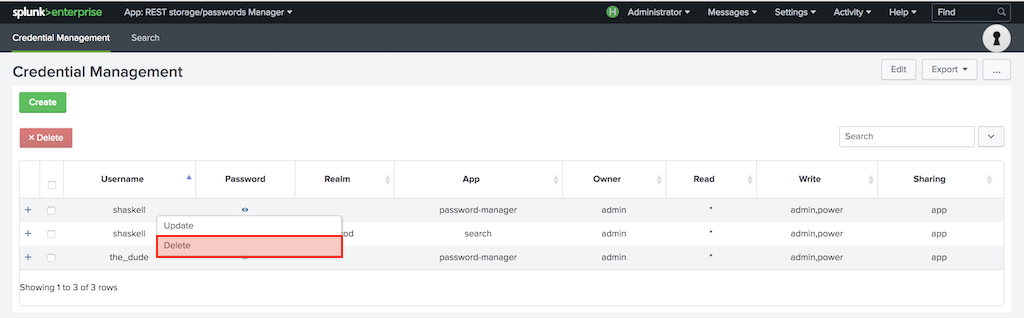
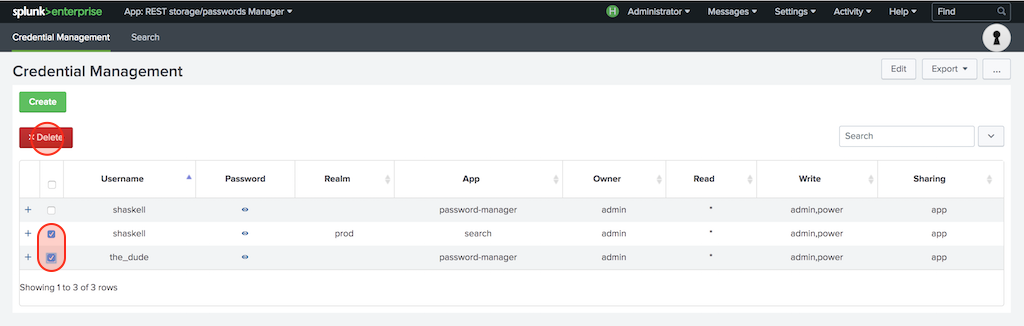
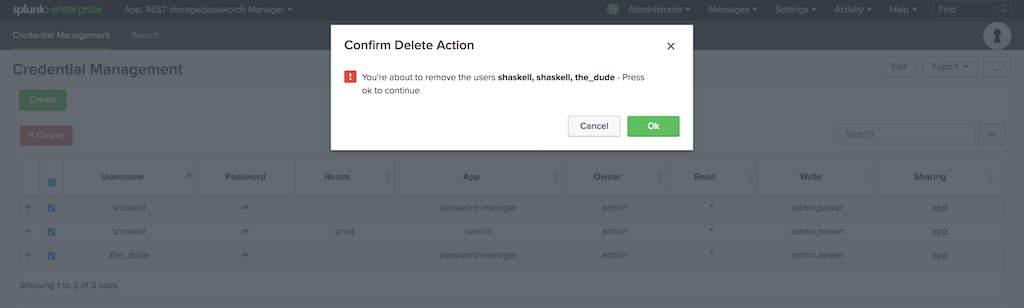
Alternatively, select any individual credential or select all using the checkbox in the header column and press the delte button.
Reveal Clear Password
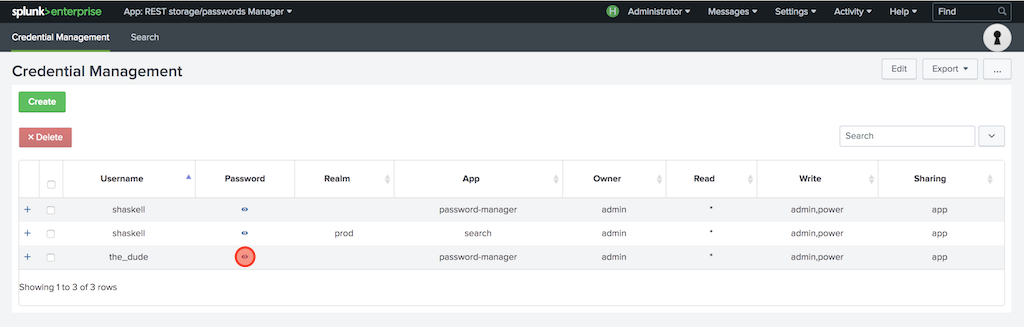
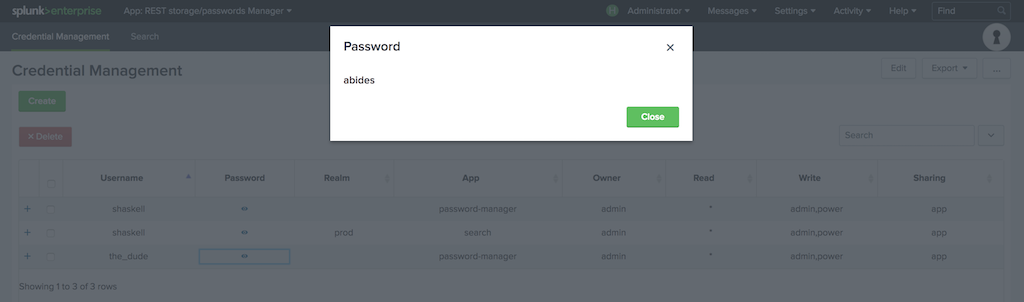
Click the eye icon to view the plain text password.
Using Stored Passwords
Please see this awesome blog post on using your newly stored credentials. When all else fails, dig into dev.splunk.com for more details.
Credits
Some of the components included in REST storage/passwords Manager App for Splunk are licensed under free or open source licenses. We wish to thank the contributors to those projects.
Twitter Bootstrap dropdown.js v3.3.7
Copyright (c) 2011-2018 Twitter, Inc. Copyright (c) 2011-2018 The Bootstrap Authors
Permission is hereby granted, free of charge, to any person obtaining a copy of this software and associated documentation files (the "Software"), to deal in the Software without restriction, including without limitation the rights to use, copy, modify, merge, publish, distribute, sublicense, and/or sell copies of the Software, and to permit persons to whom the Software is furnished to do so, subject to the following conditions:
The above copyright notice and this permission notice shall be included in all copies or substantial portions of the Software.
THE SOFTWARE IS PROVIDED "AS IS", WITHOUT WARRANTY OF ANY KIND, EXPRESS OR IMPLIED, INCLUDING BUT NOT LIMITED TO THE WARRANTIES OF MERCHANTABILITY, FITNESS FOR A PARTICULAR PURPOSE AND NONINFRINGEMENT. IN NO EVENT SHALL THE AUTHORS OR COPYRIGHT HOLDERS BE LIABLE FOR ANY CLAIM, DAMAGES OR OTHER LIABILITY, WHETHER IN AN ACTION OF CONTRACT, TORT OR OTHERWISE, ARISING FROM, OUT OF OR IN CONNECTION WITH THE SOFTWARE OR THE USE OR OTHER DEALINGS IN THE SOFTWARE.
bootstrap-table.js v1.11.1
(The MIT License)
Copyright (c) 2012-2017 Zhixin Wen wenzhixin2010@gmail.com
Permission is hereby granted, free of charge, to any person obtaining a copy of this software and associated documentation files (the "Software"), to deal in the Software without restriction, including without limitation the rights to use, copy, modify, merge, publish, distribute, sublicense, and/or sell copies of the Software, and to permit persons to whom the Software is furnished to do so, subject to the following conditions:
The above copyright notice and this permission notice shall be included in all copies or substantial portions of the Software.
THE SOFTWARE IS PROVIDED "AS IS", WITHOUT WARRANTY OF ANY KIND, EXPRESS OR IMPLIED, INCLUDING BUT NOT LIMITED TO THE WARRANTIES OF MERCHANTABILITY, FITNESS FOR A PARTICULAR PURPOSE AND NONINFRINGEMENT. IN NO EVENT SHALL THE AUTHORS OR COPYRIGHT HOLDERS BE LIABLE FOR ANY CLAIM, DAMAGES OR OTHER LIABILITY, WHETHER IN AN ACTION OF CONTRACT, TORT OR OTHERWISE, ARISING FROM, OUT OF OR IN CONNECTION WITH THE SOFTWARE OR THE USE OR OTHER DEALINGS IN THE SOFTWARE.
bootstrap-table-contextmenu.js v1.1.4
The MIT License (MIT)
Copyright (c) 2015 David Graham
Permission is hereby granted, free of charge, to any person obtaining a copy of this software and associated documentation files (the "Software"), to deal in the Software without restriction, including without limitation the rights to use, copy, modify, merge, publish, distribute, sublicense, and/or sell copies of the Software, and to permit persons to whom the Software is furnished to do so, subject to the following conditions:
The above copyright notice and this permission notice shall be included in all copies or substantial portions of the Software.
THE SOFTWARE IS PROVIDED "AS IS", WITHOUT WARRANTY OF ANY KIND, EXPRESS OR IMPLIED, INCLUDING BUT NOT LIMITED TO THE WARRANTIES OF MERCHANTABILITY, FITNESS FOR A PARTICULAR PURPOSE AND NONINFRINGEMENT. IN NO EVENT SHALL THE AUTHORS OR COPYRIGHT HOLDERS BE LIABLE FOR ANY CLAIM, DAMAGES OR OTHER LIABILITY, WHETHER IN AN ACTION OF CONTRACT, TORT OR OTHERWISE, ARISING FROM, OUT OF OR IN CONNECTION WITH THE SOFTWARE OR THE USE OR OTHER DEALINGS IN THE SOFTWARE.
Support
Feature Requests
Please submit feature requests through Github using the enhancement label so they can be tracked and discussed.
Bugs
Please submit bugs through Github using the bug label so they can be tracked and discussed.
For all other inquiries
Scott Haskell (shaskell@splunk.com)